Hi, I’m trying to build libbsd for RTEMS 6 with a BeagleVFire (RISC-V) BSP. I’ve already built and executed the Hello World sample program on my board (without libbsd).
The RTEMS 6 Users Manual appears to have Package instructions for RTEMS 5, so I tried modifying the sample command for my environment. The command I used was: ../source-builder/sb-set-builder --prefix=$HOME/buildtools/rtems/6 --host=riscv-rtems6 --with-rtems-bsp=beaglevfire 6/rtems-libbsd
But I got the following error: error: config error: rtems-bsp.cfg:104: RTEMS tools not found (beaglevfire-rtems6-gcc) found; Please check the --with-tools option or --prefix.
It turns out that beaglevfire-rtems6-gcc doe not exist because the BSP built the tool as riscv-rtems6-gcc instead.
Did I build the BSP incorrectly? Is my package command wrong? Is it something else?
Thanks!
The host is the environment you use to build on. The target is what you’re trying to build. You can use either --target=riscv-rtems6 and --with-rtems-bsp=beaglevfire or I think it should also work to use --rtems-bsp=riscv6/beaglevfire
Looking at the docs for third-party packages, I might have this wrong. But it also seems like something odd is going on in how it is parsing the target triplet for this kind of build.
So I tried your first suggestion and got the same error as before – it still kept using beaglevfire instead of riscv for the toolname. but when I changed my command to use --with-rtems-bsp=riscv/beaglevfire it appeared to work! (I kept the --target=riscv-rtems6 in my command.)
The only thing I’m unsure about is that I did not use the --host argument at all. I’m seeing references to x86_64-linux-gnu in the output. so I’m hoping that just means that it chose the correct host (I’m using an Ubuntu VM).
But hey, no errors. Thanks for the help!
The arguments --host and --target are not for RTEMS packages and are meant for host or host related builds where the results of a build run on a host operating system, for example when building a Canadian Cross-compiler (CxC) set of tools. The RSB can build anything using any build system so there is no way to have a uniform relationship between these options and how they might be used in packages. They are mostly used to get GCC to build in different ways.
The building of LibBSD should not need the arguments you are using. It uses rtems_waf and that uses the installed BSP list as the default list of target arch/bsps. As LibBSD is only built for RTEMS it knows the tools, RTEMS version and build configuration. It inspects the installed RTEMS for this information.
You can build LibBSD or any vertical stack of software as separate RSB commands but it requires each step is built and installed under the --prefix before the next stage can be completed and it is best to erase the contents of the prefix before you start. This means you need to remove a possibly working set of tools before you can test a new build.
I do not build my vertical stacks this way, I use RTEMS Deployment which contains build sets for the vertical stacks I deploy for clients and use in production. The key advantage here is all packages in the software stack are built into a staging area and the final install only happens once the build is successful.
RTEMS Deployment
RTEMS Deployment uses a feature of the RSB anyone can use. You can invoke the RSB anywhere with an absolute path to an RSB executable and it will join a local config directory under the directory you are in to the standard set of config directories it contains as if your local config is part of the RSB. You can use this feature to create and maintain a personal set of configurations. RTEMS Deployment is just a repo with a set of configurations and you can ignore the waf build parts it contains if you wish to run the RSB by hand from there. I welcome new configurations.
The AMD set of configurations target the Microzed and K260 (K26). The .bset file for the K26 is:
The order in the build set file is the order the packages are built. The example also shows how to provide a custom INI configuration to RTEMS. In the case the K26 makes a new BSP called k26 by inheriting the Xilinx ZynqMP BSP.
Thanks for the info – that’s a lot to unpack, but I’ll have to try it out. My plan is to make sure that whatever I build is repeatable from a “clean slate”, so I’ll try it out then. In the meantime what I built so far appears to be working (I hit a new snag – missing the math library “libm”, so I need to solve that first before I’m sure everything worked).
Thanks again.
Great. Deployment with the RSB is designed to make a deployable tool set in a repeatable way. You can think of it as making the escrow package for a project. This leads to a subtle but important aspect, this is done up front in a project. The downside is a steeper learning curve the first time around.
Feel free to post example configs or questions here.
Do you have the arch/bsp you are wanting to build? An RTEMS config.ini would be good?
(Sorry about the slow response.) My task is sort of ambitious, especially since it’s a part-time effort, but I have three goals – first build my system with RTEMS for a BeagelVFire, then build it for a Microchip Discover Kit, and then finally build it for the custom third-party board (which should be similar to the Discover board). I picked the BeagleVFire first since there’s already a BSP available. (Oh, and I’m also looking at adding a Raspberry Pi into the mix at some point, but that’s a very low priority.)
I think I must be missing some documentation that could help me along. I only recently realized that, although I built the sample Hello World program, the kernel/libraries for that build probably doesn’t have everything that I need to include for my project – SMP, Ethernet, math library, dynamic loading, file system, probably other things that I’m forgetting.
I think (perhaps mistakenly?) that I’ve addressed the SMP and Ethernet questions, and possibly even dynamic loading. But I still haven’t learned how to build the libm library, and haven’t even begun to think about the file system.
So I guess my first question would be – besides the RTEMS 6.1 Users Manual, what other documentation would you recommend for customizing my RSB, BSP, kernel, etc.?
(Apologies for the rambling message – I’m off today and not at my work computer. I’m just writing off the top of my head right now. I’ll try a more coherent response tomorrow. )
If we put dynamic loading to the side for now an RTEMS executable is a single statically linked image. The addresses and memory map of a BSP’s RTEMS executable is defined by the BSPs linker map and a detail you normally do not need to be concerned about unless working on a BSP.
RTEMS uses some clever linking technology to optimize what ends up in the final image loaded into memory on your target hardware. Only the parts referenced and used end up in the executable down to a function level. This means you could have 100 libraries on you application’s linker command yet of a faction of that code end up in the final image.
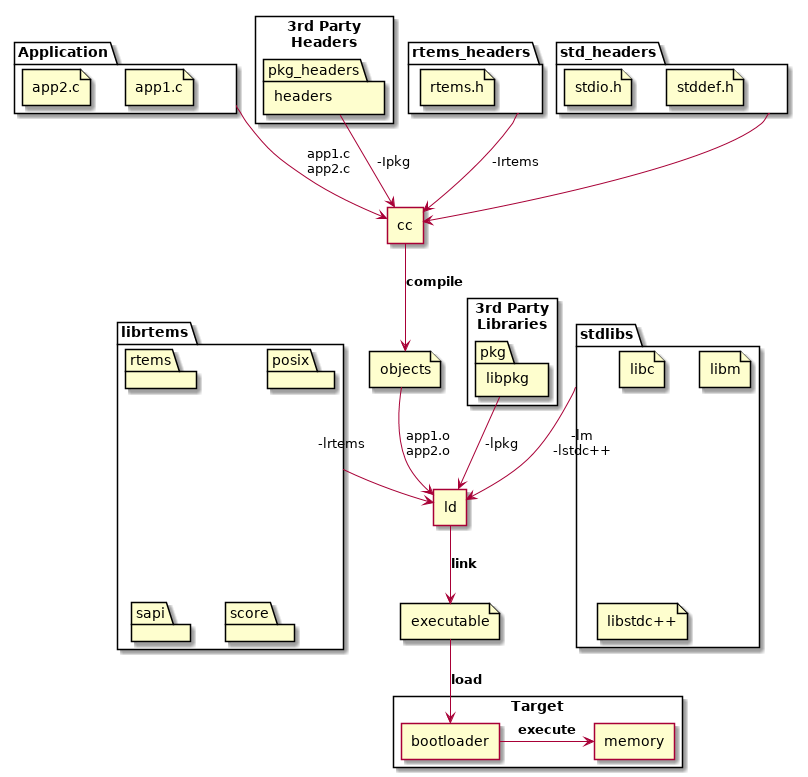
you will see libm in the stdlibs section. Those libraries are built when the tools are built. You do not build libm or libc or any of those system level libraries.
I recently added Separate RSB Configurations and that may help you understand the building of tools and third party libraries.
Thanks, I’ll take a look at that section of the User Manual. I already bookmarked the Separate RSB Configurations post yesterday!
It turns out that I do indeed have libm.a and don’t need to do anything special. I have no idea why my “find” command didn’t show any results last week but it shows the files now. I must have typed something incorrectly, but at least that mystery is solved.
 )
)