in which file i have to do changes to change the uart or usart?
The issue is likely the command you are running. ./waf bspdefaults --flags only lists generic global options.
To see the hardware-specific flags (like UART), you have to target the specific BSP:
Bash./waf bspdefaults --rtems-bsps=arm/stm32f4
That should reveal the STM32F4_ENABLE_USART_1 option you are looking for.
You can then add that to your config.ini in the root directory (where the waf script is):
[arm/stm32f4]
STM32F4_ENABLE_USART_1 = True
STM32F4_ENABLE_USART_3 = False
You will need to disable the default one (usually USART3) to make sure the one you want gets picked as the console.
Thankyou ! i tried this method before and now i found that i typed same thing with wrong arguments. i rebuild it after doing the changes but now it is getting stuck at usart.c
i am getting this in the gdb console.
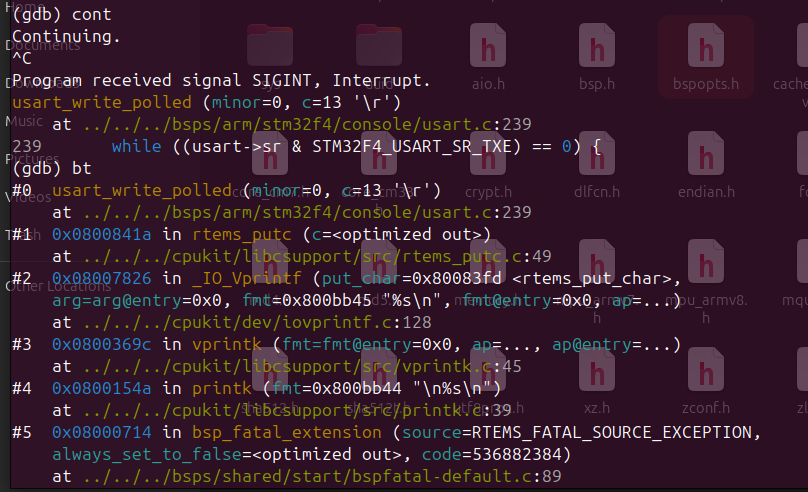
The backtrace reveals that you’re hitting two separate walls.
First, look at Frame #5: you have an RTEMS_FATAL_SOURCE_EXCEPTION. Your code actually crashed before it ever reached the UART loop.
Second, the hang at usart.c:239 is happening because RTEMS is trying to print that fatal error to the console. Since it’s stuck there, it means your USART1 hardware isn’t ‘live’—the TXE flag isn’t updating because the peripheral clock probably isn’t enabled in the RCC or the GPIO pins aren’t muxed to USART1.
You’ll need to fix the hardware clocking just to see the error message that explains why you crashed in the first place.
ok i will try to do that, but i am enabling uart 2 since i am using nucleo f401re.
i am beginner tho.
@karthikey_kadati i tried but i am still stuck!
i also tried to flash testsuits/sample/hello.exe with this
MEMORY {
	RAM_INT : ORIGIN = 0x20000000, LENGTH = 128k
	ROM_INT : ORIGIN = 0x08000000, LENGTH = 512K
}
and config.ini with both UART_2 and UART_3, it is getting stuck here,
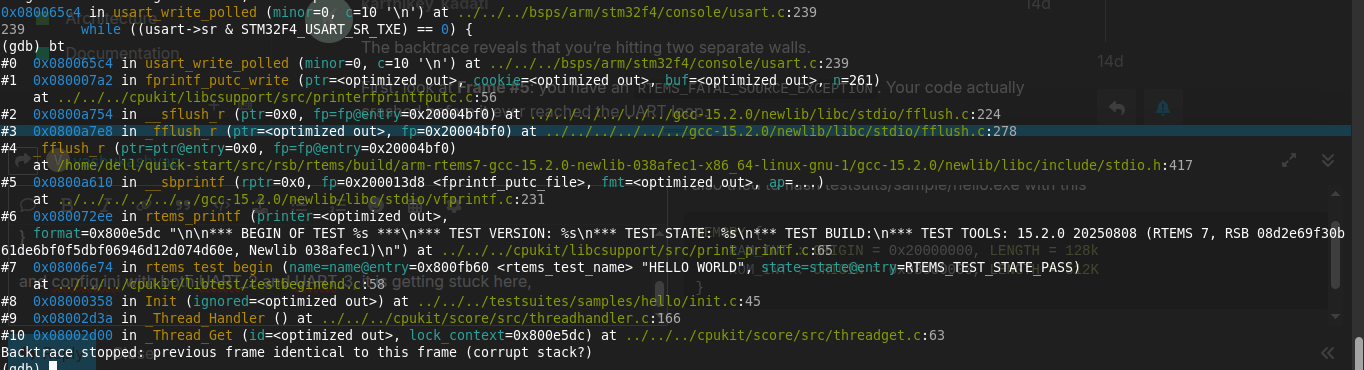
i was using nucleo-f401re, now i switch to mine nucleo-f446re and it is still not working.
i check Running Hello test on STM32 Nucleo F446RE - #7 by sunilhegde
and this forum is also ended with the same error!
i check the GPIO are enable but the clock peripheral is not getting enable. i don’t know what is wrong.
i try to check by print usart and got this.
p usart
$10 = (volatile stm32f4_usart *) 0xcab9374f
i set it to:
set usart = 0x40004400
and
cont
it print in the console and again usart set back to the (volatile stm32f4_usart *) 0xcab9374f.
why it is happening?
It looks like the usart pointer is loading a garbage address (0xcab9374f) instead of the actual peripheral base. This is likely why the clock peripheral isn’t enabling, the code is writing to an invalid memory location.
A few things to check:
-
Re-run Configure: After editing config.ini, did you run ./waf configure before ./waf build? If not, the changes won’t apply.
-
Check Indexing: In usart.c, check how the minor number maps to the usart pointer. If you enabled USART_2 but the BSP defaults to a different index, it might be accessing an out-of-bounds array element.
-
Map File: Check your build’s .map file for the address of the USART configuration table to see where that junk value is coming from.
Since this happened on both F401RE and F446RE, it’s definitely a configuration/build issue rather than hardware.
Since you’re still seeing that 0xcab9374f address, try these GDB commands to find the source:
watch usart: Run this before the crash. GDB will stop the moment that pointer gets overwritten with the garbage value.info symbol 0xcab9374f: This will tell us if that ‘address’ is actually a piece of code or a specific variable that is being misinterpreted as a pointer.
Also, double-check your config.ini. If you have both USART_2 and USART_3 enabled at the same time, ensure only one is designated as the console. If the index is wrong, it will pull a random value from memory.
i am able to run stm32f4 bsp on the nucleo-f446re .
i did the following changes:
did the changes in the linker script:
MEMORY {
	RAM_INT : ORIGIN = 0x20000000, LENGTH = 128k
	ROM_INT : ORIGIN = 0x08000000, LENGTH = 512K
}
config.ini
[arm/stm32f4]
BUILD_SAMPLES = True
STM32F4_ENABLE_USART_2 = True
STM32F4_ENABLE_USART_3 = False
STM32F4_HSE_OSCILLATOR = 80000000
it was not working because:
- the helloworld.exe example provided in the testsuits/sample is not working in my case with any configuration.
- I made the helloworld application by looking at the docs 2.7. Build Your Application — RTEMS User Manual 7.1023b8c (8th January 2026) documentation and it was not working since it was occupying most of the space. i make changes in the init.c file, compile and flash the application and it worked.
here is my init.c file
#define CONFIGURE_APPLICATION_NEEDS_CONSOLE_DRIVER
#define CONFIGURE_APPLICATION_NEEDS_CLOCK_DRIVER

#define CONFIGURE_MAXIMUM_TASKS           1
#define CONFIGURE_INITIAL_EXTENSIONS      { NULL }

#define CONFIGURE_RTEMS_INIT_TASKS_TABLE

#define CONFIGURE_INIT
#include <rtems/confdefs.h>
1 Like
Thankyou so much @karthikey_kadati for helping me. 
1 Like
Thank you so much as your solution solved the fatal error I was getting (causing gdb to drop connection)
1 Like