@c-mauderer
Memory analysis done:
I built RTEMS hello.exe for STM32F4 and checked sections:
Flash: ~75 KB which includes .text, .rodata and .data
RAM: ~6.5 KB which includes .data and .bss
I found this from TinyUSB repo examples (CDC device class):
Flash: ~20 KB
RAM: ~3 KB
Total: ~95 KB Flash, ~9.5 KB RAM(might be less due to shared libraries like newlib)
OK. With that the STM32F4 sounds at least reasonable as a target for the port. Gedares suggestion is good: Try to run the apps for your proposal. That can help you to describe your hardware setup, find goals and test scenarios and so on.
The STM32 boards usually have a hardware debugger on board (ST-Link). For any low level development, it’s usually good to know how to use a hardware debugger. So if you haven’t done that yet, you might want to try it or plan some time in your proposal to do that. Personally, I usually us stlink as a gdb server. But there are other methods too. For example, there are some notes in the RTEMS docs for the STM32H7 BSP for how to use the Cube IDE.
Thanks
Ill be getting the STM32F4 Nucleo board soon. Once it arrives, I’ll run RTEMS + TinyUSB demos on it to validate the hardware setup and test scenarios for the proposal.
Thanks
Good to know STM32F4 works as the target. I’ll procure the Nucleo board soon and test the apps as part of scoping the proposal.Also noted on the hardware debugger (ST-Link).I personally haven’t used one before, so I’ll definitely plan time to learn it - sounds essential for low-level USB driver debugging. Will check the RTEMS docs for STM32H7 BSP examples on using it.
Appreciate the stlink tip
@gedare
Update: RTEMS 7 Running on STM32F401RE Nucleo
Successfully got RTEMS 7 working on the STM32F4 board:
What I did:
I have built and flashed RTEMS 7 application to STM32F411 Nucleo
Got the GPIO control working (verified with multimeter on PA10)
Also set up the debugging environment (GDB+st-util)
I have researched TinyUSB integration and found that it’s not yet ported to RTEMS. TinyUSB supports STM32F4 hardware but lacks the RTEMS OS integration layer. Main challenges include interrupt handling, task/threading integration, and memory allocation adaptation.
I successfully compiled the TinyUSB bare-metal USB CDC example for STM32F4 and generated the firmware binary. However, I discovered that my Nucleo F401RE board doesn’t have a USER USB port accessible, only the ST-LINK USB port. The USB pins (PA11/PA12) are on the chip but not connected to any USB connector on the board.
I’ll be getting an STM32F401CCU6 Black Pill board which has a built-in USB-C port to proceed with the bare metal USB testing.
Thank you I’ll make sure to document this process and the hardware limitation, and include it in my proposal as part of the background and preparation work
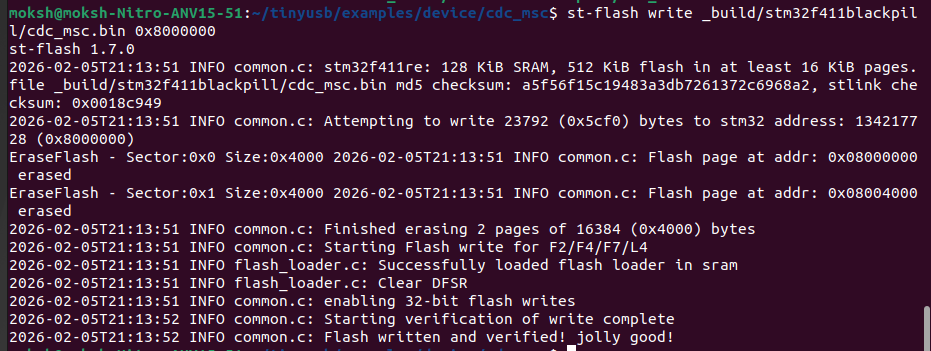
I’ve got TinyUSB running on the STM32F411 Black Pill. This is what i completed:
cross-compiled TinyUSB CDC+MSC device example for STM32F411 Black Pill,
flashed firmware via ST-Link programmer (verified successfully),
USB device enumerating correctly as “TinyUSB Device”,
Serial port /dev/ttyACM0 created and accessible on Linux host
Build details:
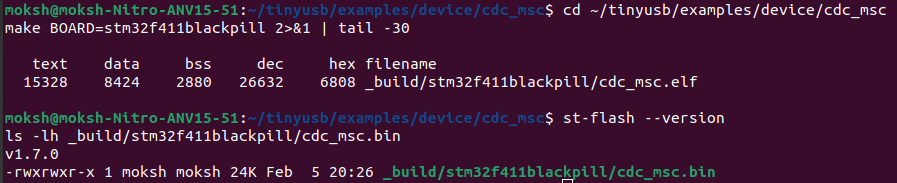
Binary size: 24KB (text: 15328, data: 8424, bss: 2880)
Successfully using ARM GCC toolchain with TinyUSB stack
Next steps:
Planning to start RTEMS integration work
Sorry for this i noticed this little late , I dont think u need a black pill solely for USB port. U can cut the micro USB type-b cable u will be exposed with four wires add female headers for convience and connect the data pins D+ D- to PA11 PA12 , again VBUS ,GND is optional u can keep it self powered through ST or Bus powered through VBUS.
looks good, from here it is pretty much about starting to develop the work plan by getting familiar with the software architecture of TinyUSB and figuring out how the best way to provide a port would be.
Got it. Before jumping into RTEMS integration, I’ll:
Study the TinyUSB architecture - specifically how the portable layer works and how existing ports (like STM32) are structured.I’ll look into RTEMS USB support and BSP architecture to understand how to best integrate TinyUSB
and put together a work plan outlining the integration approach and milestones
I’ll share my findings. Should take a couple of days to explore the codebase properly.
@gedare@c-mauderer@Dhrulian1@JoelSherrill
I looked through the TinyUSB code and how other RTOSes integrate with it.
I found that TinyUSB has an OS abstraction layer (src/osal/) that handles semaphores, mutexes, and queues. It already supports FreeRTOS, Zephyr, RT-Thread etc. but not RTEMS.
RTEMS has the basics I need:
Binary/counting semaphores
Mutexes
Statically initializable (which TinyUSB prefers)
So my plan is to create src/osal/osal_rtems.h that maps TinyUSB’s functions to RTEMS. Main challenge is queues, RTEMS doesn’t have message queues built-in, so I’ll implement them with circular buffers + semaphores.
Then build it and test CDC on the STM32F411.
Also, is anyone interested in mentoring this project? Would love feedback on the approach.
Thanks for the correction I misunderstood, I was looking at the self contained objects API (which only has semaphores/mutexes) and didn’t realize the Classic Message Queue API is available.
So for TinyUSB’s queue needs, I should use: rtems_message_queue_create() rtems_message_queue_send() rtems_message_queue_receive()
This makes the implementation much cleaner than building custom queues. I’ll map TinyUSB’s osal_queue_* functions to these RTEMS message queue calls.
Yes, great. Use the rtems_message_queue_construct instead of create if possible, as it will be possible then to avoid dynamic memory allocation as preferred by TinyUSB.
We will match contributors with mentors. I think for you the next step is going to be to start filling out your proposal, I think you have the basic ideas for this project idea worked out correctly.