I have started exploring the current FIO port, running workloads locally(linux), and investigating allocation and cleanup paths, where I identified a few small memory leaks using Valgrind. I am continuing to familiarize myself with the codebase and build workflow.
At the moment I do not have access to beaglebone black hardware, so I wanted to ask whether it still makes sense for me to pursue this project at this stage, and what areas I could effectively contribute to without hardware (currently ) .
I would also appreciate guidance on whether FIO benchmarking on RTEMS can be reasonably emulated, or if there are recommended approaches for development and testing in such a setup.
I look forward to your guidance on how best to proceed. @gedare@c-mauderer
I am also open to arranging access to suitable hardware as the project progresses if needed.
You should be able to develop the filesystem benchmarking tools using a simulator. I think several of the qemu-based targets can support adding a disk to them. You might need to ask around to get more information.
I also have been thinking about a new project to collect various benchmarks and consolidate them in one repository and provide tools to help build, run, and analyze their results.
This is still a rough idea, but there are several benchmarks (testsuites/rhealstone, testsuites/benchmarks, examples/nbench) and open issues related to benchmarks that I have captured in rtems&17. Beyond that, there are several potentially useful benchmarks like RT-Bench that would be a valuable addition.
This project idea requires quite a bit of research and scoping still, but I’m confident there’s enough worthwhile to be done here for a medium or large scoped project.
I’ve been trying to work with the current FIO port, but getting it running reliably has been a bit troublesome so far, especially while trying to bring it up on simulator targets.
Could you please advise whether I should continue focusing on porting/stabilizing FIO, or if there are other benchmarking related areas where I could contribute more effectively right now? Also, what would you recommend I work on next so I can start making useful contributions at this stage? @gedare
I think that you should continue to explore to decide which direction you might want to focus, either on FIO and improving there, or on building out a framework for benchmarks in general. Those are both suitable GSoC projects to consider.
Either way, you will want to show what you can run already as part of your proposal.
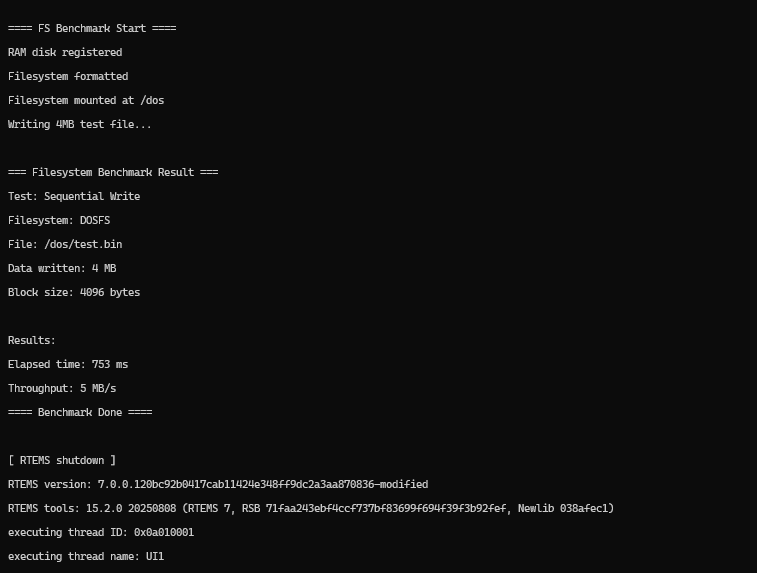
I’ve continued exploring RTEMS and modified an existing sample to run a simple filesystem benchmark in a simulator (mounting a filesystem, running sequential write workloads, and reporting timing results), giving me a working base to develop benchmarks without hardware.
My current understanding is that the project could involve studying tools like fio, extracting useful workload techniques, and implementing them as native RTEMS benchmarks tailored to RTEMS constraints. This also helps avoid compatibility and library issues seen when porting external tools, while allowing benchmarking across filesystems supported in RTEMS on simulators and hardware much more conveniently.
From my side, I am planning a simple shell-based interface, which can also be extended for automation and comparison runs.
Does this direction align with your expectations, and are there other aspects you would recommend including in the scope at this stage? @gedare
It is preferable to port existing benchmarks rather than to try to reinvent them, unless there is very good reason. I would prefer that you focus effort on investigating the suitability of FIO.
While working through the current FIO port, I’ve observed that a number of assumptions appear to be hardcoded for a specific ARM board and configuration. The implementation seems quite tightly coupled to that original environment, and when building it under RTEMS 7 on ARM (in simulation), I’ve been encountering several build and configuration issues.
From this experience, it seems that properly stabilizing and generalizing the port for broader RTEMS targets may require a more systematic effort . In fact, making the FIO integration cleaner, less board-specific, and more robust across RTEMS configurations could potentially be a worthwhile project in itself.
I would be interested in hearing your thoughts on whether you see value in treating this as a focused effort toward making the FIO port more portable and maintainable within RTEMS.
After some tinkering around The FIO binary is successfully booting via qemu in the RTEMS shell and responds to basic commands like --help and --version.
However, the actual benchmark jobs aren’t running yet because they trigger a Data Abort (NULL pointer crash). Using addr2line, I traced the crash specifically to log.c:53.
My next steps are to debug this specific memory conflict and generalize the Makefile as the current build requires several board-specific manual changes that need to be cleaned up for a more portable solution.
There was some kind of problem with gitlab. You can ask about such things in the discord #gitlab-support channel if you see it again. It has been resolved now. Thanks!
Before pushing changes I wanted to ask about the prefered workflow Should I fork the GitHub repo referenced in the paper and prepare patches there or is there another place you would prefer development to happen given the longer term plan for creating a new home for benchmarking tools in RTEMS?
We prefer to work with the upstream wherever possible. It looks like they are still quite active at GitHub - axboe/fio: Flexible I/O Tester · GitHub so that would be the preference, to contribute changes back to there and integrate it through RSB for testing with RTEMS.