Hi, I’m new to RTEMS. I started with the “Quick Start” guide in the user manual. I’ve got the RTEMS tools and bsps built (ie powerpc/qemuppc and powerpc/qoriq_e6500_32 & 64). I’ve also got the hello world program built. But I’m getting the following errors while running them.
- For qemuppc bsp: I get error: “cannot find bsp configuration file: powerpc/qemuppc.ini”.
- For QorIQ: error: user value missing, BSP qoriq_e6500_32/64 requires ‘bsp_tty_dev’: missing: bsp_tty_dev.
- I get the same “missing:bsp_tty_dev” error while testing the rtems bsp using this command:
/opt/rtems6/bin/rtems-test --rtems-bsp=qoriq_e6500_32 build/powerpc/qoriq_e6500_32.
Could someone please let me know, where to go from here?
- I built the BSP using the command
../source-builder/sb-set-builder --prefix=/opt/rtems/6 \ --target=powerpc-rtems6 --with-rtems-bsp=powerpc/qemuppc --with-rtems-tests=yes 6/rtems-kernel for qemuppc and ../source-builder/sb-set-builder --prefix=/opt/rtems/6 \ --target=powerpc-rtems6 --with-rtems-bsp=powerpc/qemuppc --with-rtems-tests=yes 6/rtems-kernel for qoriq_e6500_32/64 bsps.
The application was built using waf. This is the same waf script as it given in the Quick start guide.
- Yes, there is no
user_config.ini as I was just following the Quick start guide (but decided to use a different BSP) and there was no mention of any user_config.ini there. Could you please elaborate or point to a resource which describes how to to specify such parameters ie bsp_tty_dev?
Thanks.
Here is my wscript:
#
# Hello world Waf script
#
from __future__ import print_function

rtems_version = "6"

try:
    import rtems_waf.rtems as rtems
except:
    print('error: no rtems_waf git submodule')
    import sys
    sys.exit(1)

def init(ctx):
    rtems.init(ctx, version = rtems_version, long_commands = True)

def bsp_configure(conf, arch_bsp):
    # Add BSP specific configuration checks
    pass

def options(opt):
    rtems.options(opt)

def configure(conf):
    rtems.configure(conf, bsp_configure = bsp_configure)

def build(bld):
    rtems.build(bld)

    bld(features = 'c cprogram',
        target = 'hello.exe',
        cflags = '-g -O2',
        source = ['main.c',
                  'init.c'])
Ok, I figured out how to add the bsp_tty_dev option when running the executable. I used this command to run rtems-run --rtems-bsps=powerpc/qoriq_e6500_32 build/powerpc-rtems6-qoriq_e6500_32/hello.exe --bsp_tty_dev="/ dev/tty".
Now, I’m getting this error:
RTEMS Testing - Run, 6.0.not_released
 Command Line: /opt/rtems6/bin/rtems-run --rtems-bsps=powerpc/qoriq_e6500_32 build/powerpc-rtems6-qoriq_e6500_32/hello.exe --bsp_tty_dev=/dev/tty
 Host: Linux 43199545efe4 6.10.14-linuxkit #1 SMP PREEMPT_DYNAMIC Tue Apr 15 16:05:22 UTC 2025 x86_64
 Python: 3.11.2 (main, Apr 28 2025, 14:11:48) [GCC 12.2.0]
Host: Linux-6.10.14-linuxkit-x86_64-with-glibc2.36 (Linux 43199545efe4 6.10.14-linuxkit #1 SMP PREEMPT_DYNAMIC Tue Apr 15 16:05:22 UTC 2025 x86_64 )
error: cannot find bsp configuration file: powerpc/qoriq_e6500_32.ini
So now, both the executables are complaining about missing .ini file.
The name in the tester is not exactly the same as the RTEMS BSP name. You’ll need to find your BSP’s tester configuration under tester/rtems/testing/bsps and use the name of the ini file. In your case, it should be --rtems-bsp=qoriq_e6500_32
Ok. I changed the bsp name and now I’m getting this error even though I’ve given the --bsp_tty_dev option to the rtem_run command:
RTEMS Testing - Run, 6.0.not_released
 Command Line: /opt/rtems6/bin/rtems-run --rtems-bsps=qoriq_e6500_32 build/powerpc-rtems6-qoriq_e6500_32/hello.exe --bsp_tty_dev=/dev/tty
 Host: Linux 43199545efe4 6.10.14-linuxkit #1 SMP PREEMPT_DYNAMIC Tue Apr 15 16:05:22 UTC 2025 x86_64
 Python: 3.11.2 (main, Apr 28 2025, 14:11:48) [GCC 12.2.0]
Host: Linux-6.10.14-linuxkit-x86_64-with-glibc2.36 (Linux 43199545efe4 6.10.14-linuxkit #1 SMP PREEMPT_DYNAMIC Tue Apr 15 16:05:22 UTC 2025 x86_64 )
error: user value missing, BSP qoriq_e6500_32 requires 'bsp_tty_dev': missing: bsp_tty_dev
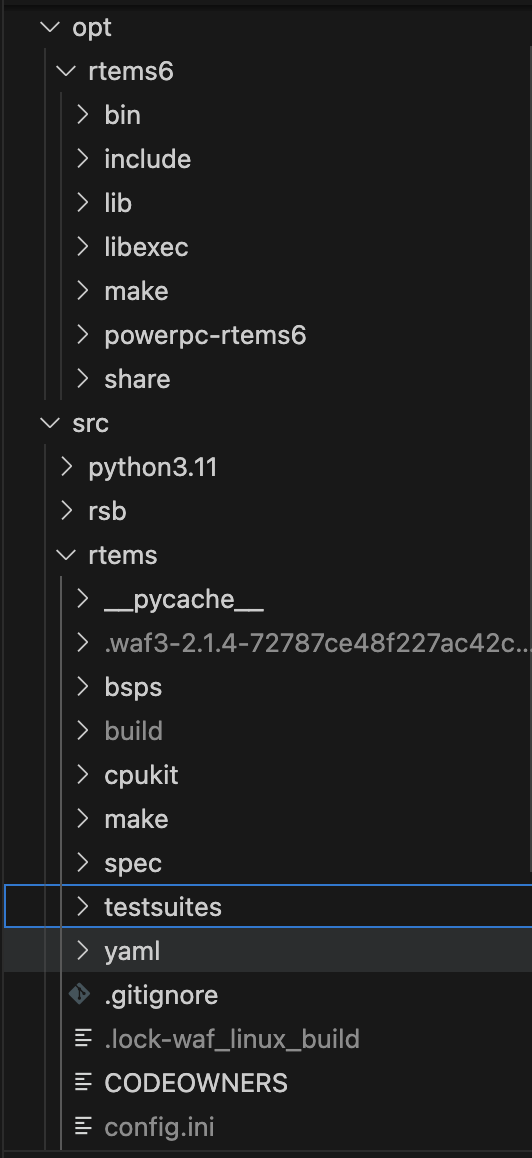
BTW, where is the tester\rtems\testing\bsp folder located? Is it in the src tree or in the install folders? Here is an image of the folders I have!
That path is the source location in rtems-tools. It is also installed as part of the tools install process. Most of the tester confguration information you need can be found here: 11.4. Tester Configuration — RTEMS User Manual 7.491f6c8 (12th May 2025) documentation
You will need to provide a user-config.ini which contains the appropriate BSP definition with require variables.
1 Like
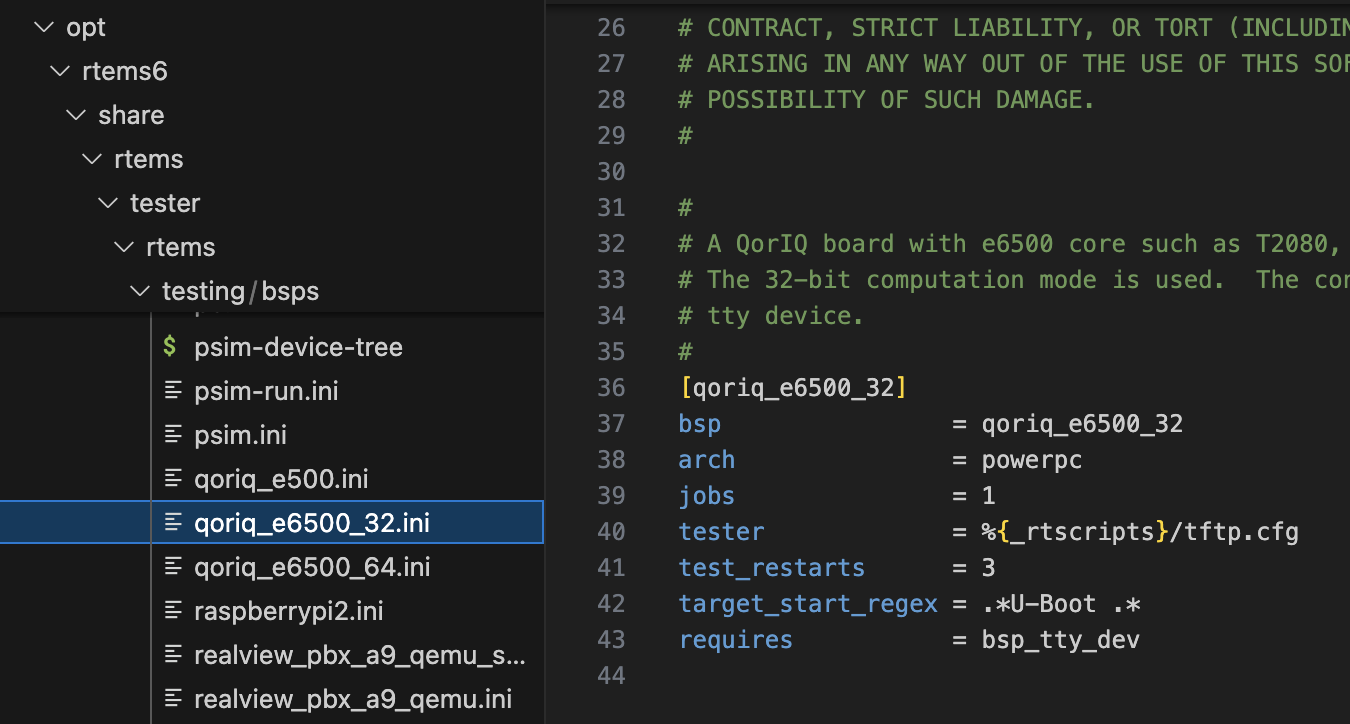
OK. I’ve found the .ini file, shown in the pic! And thanks for the link to the document. I’ll go through it to understand how it works.
Now, what does requires = bsp_tty_dev mean. Does it mean it requires a commandline or an environment parameter named bsp_tty_dev or is it the name of some other module etc?
That variable must be provided by the user. This is typically done in user-config.ini. Please see the link I referenced.
1 Like